Showing posts with label ASM. Show all posts

Friday, January 8, 2010

ASM Views

The following V$views are used for managing ASM.


View NameDescriptionInstance
V$ASM_DISKGROUPDiskgroups discovered by ASMDB
V$ASM_DISKDisks discovered by ASM including disks that are not part of any Diskgroup.DB
V$ASM_FILEASM files mounted by ASM instanceASM
V$ASM_ALIASFilename alias of the ASM FilesASM
V$ASM_OPERATIONLong running ASM operationsASM
V$ASM_TEMPLATETemplate present in diskgroup DB
V$ASM_CLIENTLists one row per each ASM instance for which the database instance has any open ASM filesDB


Thanks

Drop a file from diskgroup

Syntax

ALTER DISKGROUP diskgroup_name DROP FILEfilename’, ‘filename’..;

Note: ASM drops all the aliases associated with the filename.

Example 1

SQL> Alter Diskgroup ASMDATA DROP FILE ‘+ASMDB/gcprod/datafile/users.259.661355087’ , ‘+ASMDB/gcprod/datafile/sysaux.257.661355085’;

Thanks

Tuesday, January 5, 2010

Manage ASM Directories

In order to use ASM filename aliases, you need to create Directories.

Syntax:

To add directory
ALTER DISKGROUP diskgroup_name ADD DIRECTORY ‘filename’, ‘filename’..;

To rename directory
ALTER DISKGROUP diskgroup_name RENAME DIRECTORY ‘old_dirname’ TO ‘new_dirname’, ‘old_dirname’ TO ‘new_dirname’..;

To drop directory
ALTER DISKGROUP diskgroup_name DROP DIRECTORY ‘filename’ [FORCE or NOFORCE], ‘filename’ [FORCE or NOFORCE]..;

Where,

FORCE – To drop the directory even if it contains any alias definitions.
NOFORCE – It will not drop the directory if it contains any alias definitions

Example 1 (Add directory)

SQL> Alter Diskgroup asmdata ADD DIRECTORY ‘+ASMDATA/datafile’;

Example 2 (Rename directory)

SQL> Alter Diskgroup asmdata RENAME DIRECTORY ‘+ASMDATA/datafile’ TO ‘+ASMDATA/indexfile’;

EXAMPLE 3 (Drop directory)

SQL> Alter Diskgroup asmdata DROP DIRECTORY ‘+ASMDATA/indexfile’ FORCE;

Thanks

Mounting and Dismounting a Diskgroup

Diskgroups are automatically mounted at ASM instance startup and dismounted at ASM instance shutdown. To manually mount and dismount the diskgroups use the following statements,

Syntax:

ALTER DISKGROUP ALL or diskgroup_name MOUNT or DISMOUNT;

Example 1 (Mount a specific diskgroup)

SQL> Alter Diskgroup ASMIND Mount;

Example 2 (Dismount all diskgroups)

SQL> Alter Disgroup ALL DisMount;

Note

In the case of High and Normal Redundancy diskgroups you need all set of extents available for the diskgroups to mount. The unavailable disks may be used for redundant copies and you may mount the diskgroups without those disks. If there are sufficient disks available for the diskgroups to mount you can use the force option to mount it.

Alter Diskgroup diskgroup_name Mount Force;

The unavailable disks are taken offline. ASM drops those disks after the DISK_REPAIR_TIME expires.

In RAC ASM environments, you cannot MOUNT FORCE a disk group that is already mounted by another instance because the disks have been accessed by another instance and the disks are not locally accessible.

Thanks

Checking a Diskgroup

It checks the internal consistency of the diskgroup metadata. If any errors are found they are reported in the alert log.

Instance: ASM Instance
Privilege: Sysdba

Syntax

ALTER DISKGROUP diskgroup_name CHECK check_diskgroup_clause [REPAIR or NOREPAIR]

Where,

Check_dikgroup_clause= [ALL] or [DISK diskname] or [DISKS IN FAILGROUP failgroup_name] [FILE filename]

REPAIR = ASM attempts to repair any errors.
NOREPAIR= ASM reports the error in the alert log and does not attempt to repair it.

Example 1 (checks all the disks in the diskgroup)

SQL> Alter Diskgroup ASMDATA CHECK ALL;

Example 2 (checks only specific disks in the diskgroup)

SQL> Alter Diskgroup ASMIND CHECK
DISK data_05,
DISK data_06 NOREPAIR;

Example 3 (Checks all the disks in the failure group).

SQL> Alter Diskgroup ASMDATA CHECK
DISKS IN FAILGROUP ctrl_1;

Example 4 (checks specific files in the diskgroup)

SQL> Alter Diskgroup ASMIND CHECK
FILE ‘+ASMDB/gcprod/datafile/users.259.661355087’,
FILE ‘+ASMDB/gcprod/datafile/sysaux.257.661355085’;

Thanks

Rebalance a Diskgroup

Instance: ASM Instance
Privilege: Sysdba

Syntax

ALTER DISKGROUP diskgroup_name rebalance_diskgroup_clause

Where,

Rebalance_diskgroup_clause = REBALANCE POWER integer WAIT/NOWAIT
Integer – 0 to 11. If you omit ASM takes the value from ASM_POWER_LIMIT init parameter.
WAIT – The control is not returned to the user until the rebalance operation completes.
NOWAIT – The control immediately returns to the user and the rebalance operation takes place at the background and user can continue to do other operation.

Example 1

SQL> Alter Diskgroup ASMDATA REBALANCE POWER 10 wait;

Thanks

Resize a Disk

Note: Resizing disks in a diskgroup invokes implicit rebalancing of all the disks within the diskgroup.

Instance: ASM Instance
Privilege: Sysdba

Syntax

ALTER DISKGROUP diskgroup_name RESIZE resize_disk_clause rebalance_diskgroup_clause

Where

resize_disk_clause =[ALL SIZE size_clause] or [DISK diskname SIZE size_clause] or [DISKS IN FAILGROUP failgroup_name SIZE size_clause]

Note: If you omit the size clause then ASM uses the size returned by the OS.

Rebalance_diskgroup_clause = REBALANCE POWER integer WAIT/NOWAIT
Integer – 0 to 11. If you omit ASM takes the value from ASM_POWER_LIMIT init parameter.
WAIT – The control is not returned to the user until the rebalance operation completes.
NOWAIT – The control immediately returns to the user and the rebalance operation takes place at the background and user can continue to do other operation.


Example 1 (resizes all the disks in the diskgroup)

SQL> Alter Diskgroup ASMDATA RESIZE ALL SIZE 100G;

Example 2 (resizes only specific disks in the diskgroup)

SQL> Alter Diskgroup ASMIND RESIZE
DISK data_05 SIZE 100G,
DISK data_06
REBALANCE POWER 5;

Example 3 (resizes only specific disks in the failure group).

SQL> Alter Diskgroup ASMDATA RESIZE
DISKS IN FAILGROUP ctrl_1 SIZE 100G;

Thanks

Undrop Disk from Diskgroup

Note: To undrop a disk, the header_status from v$asm_disk view must be dropping. You cannot undrop a completely dropped disk.

Instance: ASM Instance
Privilege: Sysdba

Syntax

ALTER DISKGROUP [ALL/diskgroupname, diskgroupname..] UNDROP DISKS

Example 1

SQL> Alter Diskgroup asmdata undrop disks;

Example 2

SQL> Alter Diskgroup ALL undrop disks;

Thanks

Saturday, December 19, 2009

Add Disk to Diskgroup

Note: Adding new disks to diskgroup invokes implicit rebalancing of all the disks within the diskgroup.

Instance: ASM Instance
Privilege: Sysdba

Syntax

ALTER DISKGROUP diskgroup_name ADD [FAILGROUP failgroup_name] DISK add_disk_clause rebalance_diskgroup_clause

Where

Add_disk_clause = search_string [NAME disk_name] [SIZE size_clause] [FORCE/NOFORCE]
Force – Add disk to the diskgroup even if the disk is part of some other diskgroup.
NoForce – ASM returns error if the disk is part of some other diskgroup.

Rebalance_diskgroup_clause = REBALANCE POWER integer WAIT/NOWAIT
Integer – 0 to 11. If you omit ASM takes the value from ASM_POWER_LIMIT init parameter.
WAIT – The control is not returned to the user until the rebalance operation completes.
NOWAIT – The control immediately returns to the user and the rebalance operation takes place at the background and user can continue to do other operation.

Example 1

SQL> Alter Diskgroup ASMDATA ADD
FAILGROUP ctrl_1
DISK
'/u01/asmdisks/disk1' NAME data_05 NOFORCE,
'/u01/asmdisks/disk2' NAME data_06 NOFORCE;

Example 2

SQL> Alter Diskgroup ASMIND ADD
DISK '/dev/rhdisk33'
REBALANCE POWER 5 ;

Thanks

Dropping a Diskgroup in ASM

Instance: ASM Instance
Privilege: Sysdba
Syntax:

DROP DISKGROUP diskgroup_name INCLUDING/EXCLUDING CONTENTS;

Including Contents – Drops all the files associated with the disk group.
Excluding Contents – Drops the disk group only when it is empty. Default.

Example 1

SQL> Drop Diskgroup ASMDATA including contents;

Example 2

SQL> Drop Diskgroup ASMIND;

Thanks

Create a new Diskgroup in ASM

Instance: ASM Instance.
Privilege: Sysdba
Pre-requisite: Disks must be formatted. The path of the disk must be in the ASM_DISKSTRING. Oracle DB user must have read/write permission on the disk.

Syntax:

CREATE DISKGROUP diskgroup_name redundancy_level REDUNDANCY [FAILGROUP failgroup_name]DISK disk_clause

Where,
redundancy_level = HIGH or NORMAL or EXTERNAL
disk_clause = search_string [NAME disk_name] [SIZE size_clause] [FORCE/NOFORCE]

Force – Add disk to the diskgroup even if the disk is part of some other diskgroup.
NoForce – ASM returns error if the disk is part of some other diskgroup.

Example 1

CREATE DISKGROUP asm_data
NORMAL REDUNDANCY
FAILGROUP ctrl_1
DISK
'/u01/asmdisks/disk1' NAME data_01 NOFORCE
,'/u01/asmdisks/disk2' NAME data_02 NOFORCE
FAILGROUP ctrl_2
DISK
'/u03/asmdisks/disk3' NAME data_3 NOFORCE
,'/u03/asmdisks/disk4' NAME data_4 NOFORCE;

If the size clause is omitted the full disk is assigned.

Example 2

SQL> CREATE DISKGROUP ASMIND External REDUNDANCY DISK
'/dev/rhdisk6' SIZE 51200M ,
'/dev/rhdisk7' SIZE 51200M ,
'/dev/rhdisk8' SIZE 51200M ;

If the name clause is omitted the disks are given a system generated name.

Thanks

Thursday, December 10, 2009

Install Oracle 10g on Windows XP - Part 3

In the last part2 we discussed ASM installation. In this part we will see the RDBMS installation.

Step 1: Invoke the OUI. Select the Advanced installation option and then click Next.
Step 2: Select the installation type for eg., Enterprise, standard edition etc.
Step 3: Specify the Oracle Home details. Choose a different path from ASM home.


Step 4: In the next page select the option to create the database.


Step 5: Specify a Database Name. Choose the character set.


Step 6: Select Database control for Database Management.


Step 7: In the select database storage option page, select ASM.


Step 8: In the next page click the option that best matches your requirement.


Step 9: Select the ASM Disk Group.

If the space available is not enough it will show the following screen.

Select the disks so that the required space is available. Click Next

Step 10: Click Install.


Click Exit.
The oracle RDBMS is installed.


Thanks

Install Oracle 10g on Windows XP - Part 2

In this part we will see the ASM installation and ASM instance Creation.

Step 1: Invoke the Oracle Universal Installer. In the Welcome Screen select Advanced Installation and click Next button.


Step 2: In the Select Installation Type, select the appropriate choice. In our case we select Standard Edition.


Step 3: Specify the ASM Home details.


Click Next.


Step 4: Check for any errors and correct it if any. Click Next.


Step 5: Choose the Configure Automatic Storage Management option and specify the SYS password. Click Next.


Step 6: In the next screen do the following,
  1. Specify the Disk Group name.
  2. Choose the redundancy type.
  3. Select the candidate disks you want to assign for this disk group.

Note: You must have stamped the disks before to make Oracle recognize the disks. If you have not stamped the disks already, click the stamp disks button to invoke the asmtool utility. You can then stamp the disks as shown in the Stamp disks section in the part 1.


Click Next


Step 7: Click Install.


Click the Exit button. The ASM installation is completed.

Note: You can use the DBCA to create addition disk groups.

Click Here for Part 1

Click Here for Part 3

Thanks

Wednesday, December 9, 2009

Install Oracle 10g on Windows XP using ASM - Part 1

Hardware Requirements

RAM - 256MB Minimum. 512 MB Recommended
Virtual Memory - 512 MB to 1 GB
Disk Space - 2.5 GB Minimum

Software Requirements

System Architecture - Processor: Intel X86, AMD 64 and Intel EM64T
Operating System - Windows XP Professional, Windows 2000

Install Loopback Adapter

If you are installing Oracle Database on a DHCP computer or on a Non-Networked Computer, then you may want to install Loopback Adapter. The Loopback adapter and the local IP address simulate a networked computer. If the Computer is connected to a network then this step may be ignored.

Click Here for the steps to install loopback adapter.

Preparing Diskgroups for Automatic Storage Management

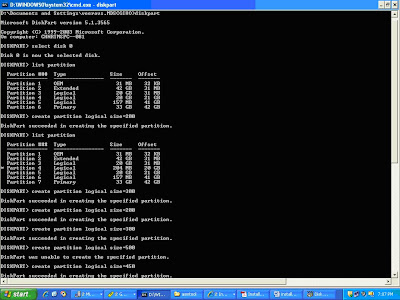
Step 1: Create Disk Partitions

For this sample installation I use only one Disk and create logical partitions on it. For production implementation create a primary partition on each disk.


To create partitions,
C:\> Diskpart
DISKPART> list disk
DISKPART> Select disk 0

To create a logical partition, the size is in MB.
DISKPART> Create partition logical size=1024

To create a primary partition , the size is in MB
DISKPART> Create partition primary size=1024

To view the partitions created
DISKPART> List partition

Repeat for other disks

The created volumes must be unformatted, that is, the Fs column must be blank in the following command. In the following output NTFS indicates NT File system and hence cannot be used as ASM disk.

Stamp ASM Disks

To use ASM, the disks must be stamped with a header. Use ASMTOOL to stamp each partition with an ASM label so that oracle can recognize these partitions as candidate disk. Navigate the oracle media to find the asmtool folder. Click the asmtoolg.exe.

Select the Add or change label dialog and press Next button.

Select the Candidate Disk and assign a asmdisk group name. Click Next.

Click Next.

Click Finish.

Repeat the process for each disk group.

Click Here for Part 2

Click Here for Part 3

Thanks

Wednesday, November 25, 2009

ASMCMD

In this post I will provide you with some commonly used ASM commands and how to use it to perform some day to day activities.

Before invoking the ASM command, set the following environmental variables,

$ Export ORACLE_SID=+ASM1
$ Export ORACLE_HOME=/oracle/app/oracle/product/10.2.0.1/db_1

To invoke the ASMCMD

$ asmcmd –p
If the –p option is used, it displays the path in the prompt.


To navigate the directories (same as in Unix) case insensitive


To Create a File alias

$ asmcmd
ASMCMD> cd asmdb/gcprod/datafile
ASMCMD> mkalias +asmdb/gcprod/datafile/USERS.259.661355087 users_01.dbf

To remove a file alias

ASMCMD> rmalias +asmdb/gcprod/datafile/users_01.dbf

To check space usage

du – displays disk usage in MB. Similar to du command in unix.


lsdg – lists the disk group usage.


To find the RDBMS instances connected to ASM
lsct – lists the ASM Client information


To create and delete directories and files

ASMCMD> mkdir dummydir
ASMCMD> rm dummydir
ASMCMD> rm +asmdb/gcprod/datafile/USERS.259.661355087

Note: The file must be closed before deleting it otherwise the rm command will throw error.

Searching through the ASM directories


Thanks

Top Blogs

Friday, November 6, 2009

ASMLIB

ASMLIB is a storage management interface. ASMLIB is not required for ASM to function; it is an add-on library that simplifies the tasks of managing and discovering the disks.

Function of ASMLIB

Disk Discovery: It provides more information about the disk attributes enabling easy discovery of disks. Avoids disks being added to one node and not been discovered by other nodes in the cluster.

IO Processing: Enables more efficient IO.

Thanks

ASM Rebalance

The Rebalance operation provides an even distribution of file extents across all disks in the diskgroup. The rebalance is done on each file to ensure balanced I/O load.

The RBAL background process manages the rebalance activity. It examines the extent map for each file and redistributes the extents to new storage configuration. The RBAL process will calculate estimation time and the work required to perform the rebalance activity and then message the ARBx processes to actually perform the task. The number of ARBx process starts is determined by the parameter ASM_POWER_LIMIT.

There will be one I/O for each ARBx process at a time. Hence the impact of physical movement of file extents will be low. The asm_power_limit parameter determines the speed of the rebalance activity. It can have values between 0 and 11. If the value is 0 no rebalance occurs. If the value is 11 the rebalance takes place at full speed. The power value can also be set for specific rebalance activity using Alter Diskgroup statement.

The rebalance operation has various states, they are

WAIT: No operations are running for the group.
RUN: A rebalance operation is running for the group.
HALT: The DBA has halted the operation.
ERROR: The operation has halted due to errors.

You can query the V$ASM_OPERATION to view the status of rebalance activity.

The rebalance activity is an asynchronous operation, i.e., the operation runs in the background while the users can perform other tasks. In certain situation you need the rebalance activity to finish successfully before performing the other tasks. To make the operation synchronous you add a keyword WAIT while performing the rebalance as shown below.

SQL> Alter diskgroup ASMDB Add Disk ‘/dev/sdc4’ Rebalance power 4 WAIT;

The above statement will not return the control to the user unless the rebalance operation ends.

Thanks

Top Blogs

Wednesday, November 4, 2009

ASM redundancy and Failure Groups

A Failure group is a collection of disks that can become unavailable due to failure of one of its associated components (controllers, HBAs, Fiber channel switches, Disks, Entire arrays etc).

A diskgroup is divided in to failure groups. Each disks in the diskgroup is part of one failure group. The disks in different failure groups does not share the same failure component (HBAs, controllers etc).

ASM uses Mirroring for redundancy. Three types of redundancy are supported by ASM. They are,

Normal Redundancy: 2-way mirrored. At least two failure groups are needed.
High Redundancy: 3-way mirrored. At least three failure groups are needed.
External Redundancy: No ASM mirroring. 3rd party redundancy mechanism like RAID is used.

After creating a diskgroup you cannot change the redundancy level. If you want to change it then create a separate diskgroup and move the files to that diskgroup (using RMAN restore or DBMS_FILE_TRANSFER).

ASM mirrors extents instead of disks. The first copy of the extent is called the primary extent and its mirrored extent is called secondary extent. For high redundancy there are two secondary extents. The primary and secondary extents together are known as extent set. An extent set always contains same data. For read/write operations, each extent in an extent set is written in parallel and only primary extent is read.

Note: Disk group meta data is always triple mirrored with normal or high redundancy.

Thanks

Top Blogs

Tuesday, November 3, 2009

ASM Templates

A template is a collection of file attributes that are applied to the ASM files. It is associated with a Disk Group. Whenever a file is created the file attributes specific to the template are applied to the files. For eg., if we want to create a users tablespace that contains data file we use the DATAFILE template.

Default Template: When you create a disk group, Oracle creates system default template for the disk group. It includes default attributes for various file types like control files or data files. The DBA can mention whether the files created via the template should be 2-way or 3-way mirrored and Coarse or fine striped.

Default templates and their attributes.

Ref: http://www.dbasupport.com/oracle/ora10g/ASM0301.shtml

Some of the attributes of default templates can be modified, but cannot be deleted. The redundancy and striping cannot be modified. You can also create user defined templates.

The drawback of ASM file templates is if you want to modify any of the file attributes after it is created, then you must use RMAN to copy the file to a new file with new settings.

To view the ASM template details use the following query.

SQL> Select * From V$ASM_TEMPLATE;

Thanks

Top Blogs

ASM Files

ASM Files are named using OFA standard and employs OMF for managing files for example when you drop a tablespace ASM will automatically deletes the files associated with the tablespace. Also I need not specify a file name while creating a data file, ASM will automatically assign a unique name.

A typical ASM file looks like this
+ASMDB/gcprod/datafile/users.259.661355087

The ASM file has 5 components, they are

ASM Disk Group : +ASMDB
Database name : gcprod
File type : datafile
Tag : Specific information about the file. In this case it is the tablespace name, users
file.incarnation : A number pair that insure uniqueness

ASM File Alias

Alias are used to represent the files using user friendly names.

To create an alias

SQL> Alter Diskgroup ASMDB add alias '+ASMDB/gcprod/datafile/users1.dbf' for '+ASMDB/gcprod/datafile/users.259.661355087' ;

Instead of using full name you can also use only the disk group name and the numeric identifier as shown below,

SQL> Alter Diskgroup ASMDB add alias '+ASMDB/gcprod/datafile/users1.dbf' for '+ASMDB.259.661355087';

To rename an alias

SQL> Alter Diskgroup ASMDB rename alias '+ASMDB/gcprod/datafile/users1.dbf' to '+ASMDB/gcprod/datafile/users2.dbf';

To delete an alias

SQL> Alter Diskgroup ASMDB delete alias '+ASMDB/gcprod/datafile/users1.dbf';

Note: Once you create an alias the files will not become OMF. Hence the files will not be deleted automatically when the tablespace is dropped. You have to delete the files manually as shown below,

Drop file using alias

SQL> Alter Diskgroup ASMDB drop file '+ASMDB/gcprod/datafile/users1.dbf';

Drop file using numeric name

SQL> Alter Diskgroup ASMDB drop file '+ASMDB.259.661355087';

Drop file using fully qualified name

SQL> Alter Diskgroup ASMDB drop file '+ASMDB/gcprod/datafile/users.259.661355087';

Thanks

Top Blogs

Followers

Powered By Blogger
 

Oracle Database Administration. Copyright 2008 All Rights Reserved Revolution Two Church theme by Brian Gardner Converted into Blogger Template by Bloganol dot com